

















Table of Contents
- • Paragon Software Review Summary
- • About Paragon Software
- • Other opinions about Paragon Software
- • Paragon Software Overview
- • Paragon Software Review
- • Paragon Software APFS for Linux Review
- • Paragon Software APFS for Windows Review
- • Paragon Software Pros & Cons
- • Digital Delivery of Paragon Software Products
- • Contact Paragon Software Support
- • Where to buy Paragon Software?
- • Conclusion of Paragon Software reviews & ratings
Paragon Software Review Summary
Paragon Software is a specialized software developer offering cross-platform file system drivers and backup solutions. It generally serves both personal and professional users needing access to proprietary file systems and data protection tools. While its products tend to deliver advanced features, overall performance may be impacted by customer support and license management issues.
Highlights
- Suitable for users needing cross-platform file access and backup
- Offers file system drivers and backup software for multiple operating systems
- Advanced features offset by unreliable support and activation challenges
- Balanced rating of 6.0/10 reflecting strengths and trade-offs
Within the broader category of data management software, alternatives exist that provide stronger support and more reliable disaster recovery. The ecosystem includes many options, making it advisable to weigh feature needs against customer service expectations. For detailed information, see the Paragon Software review.
About Paragon Software
Managing files across different operating systems can be challenging due to incompatible file systems and limited backup options. Many users face frustration when trying to access or protect their data reliably outside native environments. Ensuring seamless file access and secure backups is essential for both personal and professional settings.
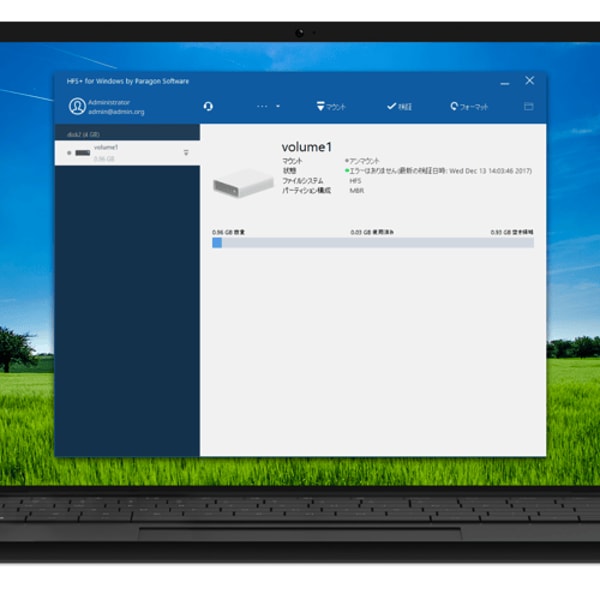
Paragon Software develops specialized software that enables cross-platform file system access and advanced backup solutions. Positioned within the data storage software sector, it provides tools for reading and writing Apple’s APFS on Windows and Linux, along with comprehensive backup and recovery applications designed for global users. Their offerings cater to both individual and business needs.
With a history spanning over 30 years, Paragon Software serves approximately 8 million customers worldwide. The company’s products receive recognition for extensive file system support and feature-rich backup capabilities. However, user feedback indicates notable challenges in customer support responsiveness and license management, which are important factors to consider.
This Paragon Software review helps users requiring advanced file access and backup evaluate the brand’s fit. Those prioritizing strong customer service or reliable disaster recovery might encounter difficulties. For a detailed assessment, see our that balances features and support limitations.
Other opinions about Paragon Software
Opinions and insights gathered from trusted review articles and authoritative websites covering Paragon Software.
Paragon Software Overview
Paragon Software is a Germany-based developer specializing in file system drivers, backup, and recovery software since 1994. The company operates globally with offices in North America, Europe, Japan, and Russia, offering software products and licensing for personal and business use.
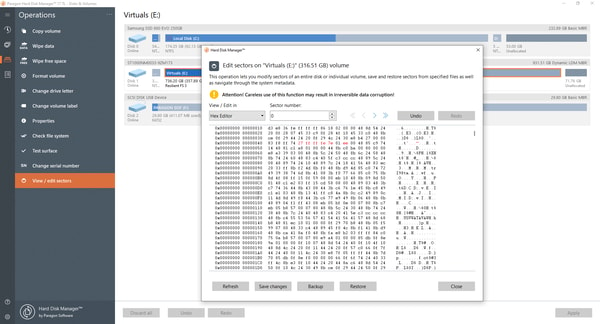
Within the software industry, Paragon Software focuses on enabling cross-platform file system access and providing backup solutions compatible with multiple operating systems such as Windows, Linux, and macOS. Its product range includes tools for file system drivers, disk management, and embedded solutions designed for both individual users and IT professionals. This functional scope is highlighted in the Paragon Software Review context, emphasizing their technical approach to data storage software.
Structurally, the company maintains a mid-sized operational model centered on product development, marketing, and global sales via direct and partner channels. Notable platforms include the Paragon Licensing Center and Partner Portal, supporting software distribution and license management, while the corporate focus remains on cross-platform compatibility and ongoing software updates for recent OS releases.
Paragon Software Review
Paragon Software is a company specializing in cross-platform file system drivers and backup software, with over 30 years of experience. Their core focus is enabling access to Apple APFS formats on Windows and Linux platforms, along with providing backup and recovery solutions for personal and business users. The brand is recognized for its technical expertise in data storage software.
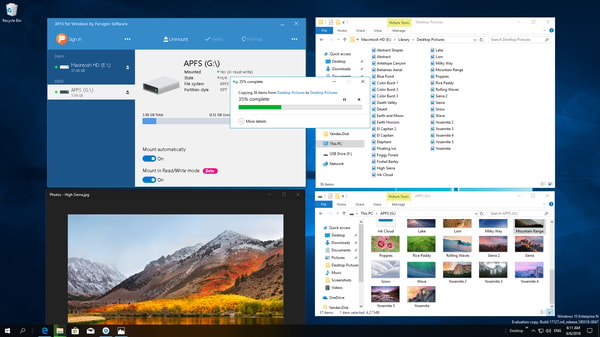
The product range includes tools that offer file read/write support, backup scheduling, password protection, and compatibility across multiple operating systems. Paragon Software occupies a niche as a provider of specialized file system drivers and backup solutions designed for diverse environments. Their solutions cater to users who require robust file system access and backup options across different platforms.
Paragon Software Highlights
- Cross-platform file system support
- Backup scheduling and password protection
- Compatibility with multiple OS versions
- Advanced file system drivers
- Data backup and recovery tools
Paragon Software APFS for Linux Review
APFS for Linux by Paragon Software allows full read and write access to APFS-formatted volumes, designed for Linux users who require reliable disk access. The installation process is streamlined with scripts compatible with a wide range of Linux kernel versions.
This file system driver supports macOS APFS versions from 10.13 to 15 and includes automatic driver maintenance through DKMS. It delivers high-performance access to APFS volumes within Linux environments.
Price $53.02 • paragon-software.com
Paragon Software APFS for Windows Review
APFS for Windows is designed for users who need stable read and write access to APFS-formatted drives on Windows systems. It supports various storage types, including HDDs, SSDs, and flash drives, along with the latest macOS APFS versions and FileVault encrypted volumes.
The driver offers consistent performance while balancing resource usage, providing a native look and feel on Windows platforms. It aims to maintain steady throughput without excessive system load.
Price $32.83 • paragon-software.com
Paragon Software Pros & Cons
Paragon Software provides robust cross-platform support for APFS access and a versatile backup solution that accommodates multiple backup types and scheduling options. It offers a free edition for personal use and supports the latest Windows and macOS versions, making it suitable for a broad range of users. The availability of OEM and embedded solutions further extends its applicability across different environments.
However, users should be aware of notable issues with customer support, which is frequently reported as unresponsive. Problems with license management and activation portals can complicate product use, and some users have experienced reliability concerns with disaster recovery features. Additionally, software usability and installation difficulties have been documented, which may affect overall user experience.
- • Supports cross-platform APFS access
- • Backup software with multiple backup types
- • Backup scheduling options
- • Free edition available for personal use
- • Supports latest Windows versions
- • Supports latest macOS versions
- • OEM and embedded solutions available
- • Strong backup compression and password protection
- • Customer support largely unresponsive
- • License management and activation portal issues
- • Disaster recovery features unreliable in some cases
- • Software usability and installation problems
Digital Delivery of Paragon Software Products
Paragon Software products are delivered exclusively through digital download, with no physical shipping involved. Customers can access their purchases immediately via the official website without geographic restrictions. This method ensures global availability and direct access to all software products.
Access to purchased products is granted immediately upon completion of the purchase, allowing instant download and installation. There is no tracking or shipping cost associated with the digital delivery process. The company uses its website and license management portal for product activation and access.
Contact Paragon Software Support
Users can reach Paragon Software support through multiple channels including email and phone. While live chat support is not available, assistance is offered for licensing, installation, configuration, and backup issues.
- Email: [email protected]
- Phone: +18883475462
For help with their products and services, users are encouraged to contact support using the provided methods. Although support responsiveness has faced criticism, these are the main options available for customer assistance.
Where to buy Paragon Software?
Users interested in Paragon Software can officially purchase products through the company's website, where the platform provides structured account systems, accessible support, and clear policy information. Buying from paragon-software.com ensures direct access to licenses and product updates, although some users note challenges with license portal management. Since Paragon does not list physical retail availability, offerings may not be found in offline stores, and marketplace alternatives may present varying reliability and policy differences compared to the official source.
Conclusion of Paragon Software reviews & ratings
Paragon Software holds a notable position in software development by offering specialized file system drivers and backup solutions that address cross-platform compatibility. Their strengths include supporting APFS access across Windows and Linux, comprehensive backup options, and ongoing updates accessible through paragon-software.com, making them a relevant choice for users needing these features.
Those interested in exploring these tools further can find value in the detailed insights available within this Paragon Software review. It serves as a practical resource for assessing the software's capabilities and considerations, allowing readers to revisit the information as needed for informed decisions.
Editorial notes reflect aggregated buyer feedback and our independent editorial review of publicly available information. They are for informational purposes only and do not constitute endorsements. Purchases are made at your own discretion, and we are not responsible for transactions or outcomes related to this store. Experiences may vary. This content is assisted by AI and reviewed by our editorial team. While we strive for accuracy, AI-supported information may not always be 100% precise, so please verify any critical details.

